





Public Wi-Fi is everywhere. Coffee shops, airports, hotels and coworking spaces all offer quick access. However, convenience often comes at the cost of security. When you send sensitive information such as credit card details, passwords, Social Security numbers or confidential business data over unsecured networks, you risk exposure.
Understanding how that exposure happens is essential before deciding whether a VPN is the right solution.
Why Public Networks Are Risky
When data travels across the public internet without proper encryption, it passes through multiple routers and servers. Each point in that journey is a potential interception point. Technically, attackers can use packet-sniffing tools to capture unencrypted traffic moving across shared networks.
This risk becomes more serious in so-called “evil twin” attacks. In this scenario, an attacker creates a fake Wi-Fi network that looks identical to a legitimate one. For example, instead of connecting to “CoffeeShop_WiFi,” you might connect to a malicious network with the same name. Once connected, all your traffic flows through the attacker before reaching the internet.
As a result, sensitive information can be captured even before it leaves the local environment.
How a Personal VPN Works
A Virtual Private Network, or VPN, attempts to reduce this risk by encrypting your internet traffic and routing it through a remote server.
Here is how the process typically works:
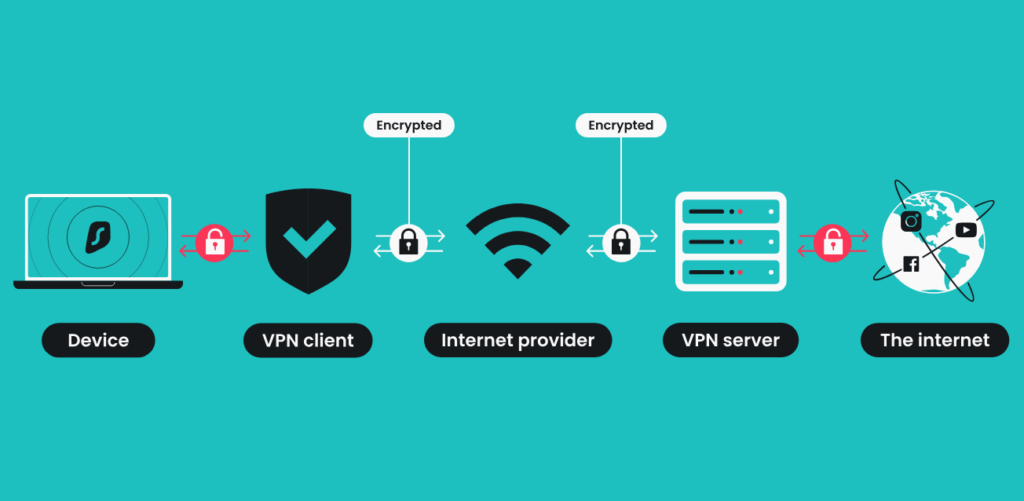
- Your device encrypts outgoing data before it leaves your system.
- The encrypted traffic travels to the VPN provider’s server.
- The VPN server decrypts the traffic and forwards it to the destination website.
- The website responds to the VPN server, which re-encrypts the data and sends it back to you.
Because of this structure, your internet service provider sees only encrypted traffic going to the VPN server. Meanwhile, websites see the VPN server’s IP address instead of your real one.
Therefore, a VPN creates a secure “tunnel” between you and the VPN provider. However, it does not eliminate trust. Instead, it shifts trust from your ISP and public routers to the VPN provider.
The Different Types of VPNs
Not all VPNs serve the same purpose. The level of privacy you gain depends heavily on who operates the service.
1. No VPN
If you connect directly to the internet, your ISP can see your browsing destinations, and your traffic passes through unknown routers along the way. You rely entirely on HTTPS encryption and your ISP’s policies.
2. Corporate VPN
A corporate VPN connects you securely to your employer’s internal network. Its goal is business security, not personal privacy. In fact, your employer may log activity inside that tunnel.
3. Third-Party VPN
Commercial VPN services encrypt your traffic and route it through their servers. While this hides your IP address from websites and encrypts traffic from your ISP, the VPN provider itself can see decrypted traffic at its server.
4. Bring Your Own VPN (Self-Hosted)
Some advanced users run their own VPN servers. This reduces reliance on commercial providers but still requires trust in the hosting infrastructure and software security.
In every case, trust does not disappear. It simply changes hands.
The Risks of Third-Party VPN Providers
Many people assume a VPN guarantees anonymity. That assumption is dangerous.
A third-party VPN provider can technically see:
- The websites you connect to
- The timing of your connections
- The volume of data transferred
Although reputable providers claim “no-log” policies, users must rely on transparency and independent audits to validate those claims.
Additionally, risks include:
- Data monetization: Free VPN services often sell user data.
- Security breaches: If the provider is hacked, stored logs may leak.
- Legal pressure: Governments can compel providers to hand over records.
Therefore, while a VPN may protect you from public Wi-Fi attackers, it may introduce a new centralized risk.
What VPNs Do Well
When used properly, VPNs provide clear benefits.
First, they encrypt traffic between your device and the VPN server. This is especially valuable on untrusted Wi-Fi networks.
Second, they hide your IP address from websites, which can reduce location tracking and bypass geographic restrictions.
Third, in countries with internet censorship, VPNs can provide access to restricted content.
In these scenarios, a reputable VPN significantly enhances security and privacy.
What VPNs Do Not Do
Despite their benefits, VPNs are not magic shields.
They do not block malware automatically.
They do not prevent phishing attacks.
They do not stop websites from tracking you through cookies or browser fingerprinting.
They do not make you anonymous if you log into personal accounts.
Moreover, VPNs can reduce internet speed because traffic must be encrypted, decrypted and rerouted through additional servers.
VPNs in the Age of HTTPS
It is also important to note that most modern websites use HTTPS encryption. This already protects data in transit between your browser and the website.
As a result, for everyday browsing on secure websites, the additional benefit of a VPN may be smaller than many advertisements suggest. However, on public Wi-Fi or in high-risk environments, a VPN still adds a meaningful protective layer.
When a VPN Makes Sense
A VPN is most useful when:
- You frequently use public Wi-Fi networks.
- You travel in countries with internet censorship.
- You want to reduce IP-based tracking.
However, choosing a reputable provider is critical. Research transparency reports, audit history and jurisdiction before subscribing.
Final Perspective
VPNs are tools, not solutions to every privacy problem. They protect against specific threats, particularly local eavesdropping and IP exposure. At the same time, they introduce a new trust relationship with the provider.
Ultimately, strong digital hygiene matters more than any single tool. Use HTTPS websites. Avoid suspicious links. Enable multi-factor authentication. Keep devices updated. And if you choose to use a VPN, understand both its strengths and its limits.
Online privacy is not achieved through one product. It is built through informed decisions and layered protection.
Related posts:
 Rwanda Signs Landmark Deal to Establish Drone Testing and Innovation Center with Zipline
 OpenAI Discontinues GPT-4o Over Safety Concerns
 Companies Turn to AI for Smarter Decision-Making
 UGHE Launches Rwanda’s First HD²SS System
 Grok Admits Security Flaw After AI-Generated Images of Minors Appeared on X
 WhatsApp to Introduce Stronger Privacy Controls to Protect User Messages
 Canada Voices Growing Worry It Could Be Next After Trump’s Greenland Signals
 Digital platforms reshape how job seekers connect with employers
 Russia Targets WhatsApp in Growing Battle With Foreign Tech Giants
 ChatGPT to Introduce Adult-Oriented Erotic Content
 Starlink Offers Free Internet Access in Iran
 Samsung Launches Three-Panel TriFold Phone to dominate Apple and Huawei
 China and the United States Compete to Build Data Storage Facilities in Space
 Solar Storms Could Disrupt Satellite and GPS Operations
 Trump’s 2028 Space Plan: Ensuring American Space Superiority Amid Global Competition
 OpenAI Accuses DeepSeek of Using Its AI Technology
 How AI Is Transforming App Creation Through “Vibe Coding”
 Tesla’s Game-Changing Pi Phone Is Almost Here — Everything CEOs & Innovators Should Know
 4.3 Million Rwandans Have Gained Digital Literacy
 China’s 16-Ton Jiutian Drone Completes Historic First Flight