





Google updates Quick Share
Google has updated its Quick Share application.
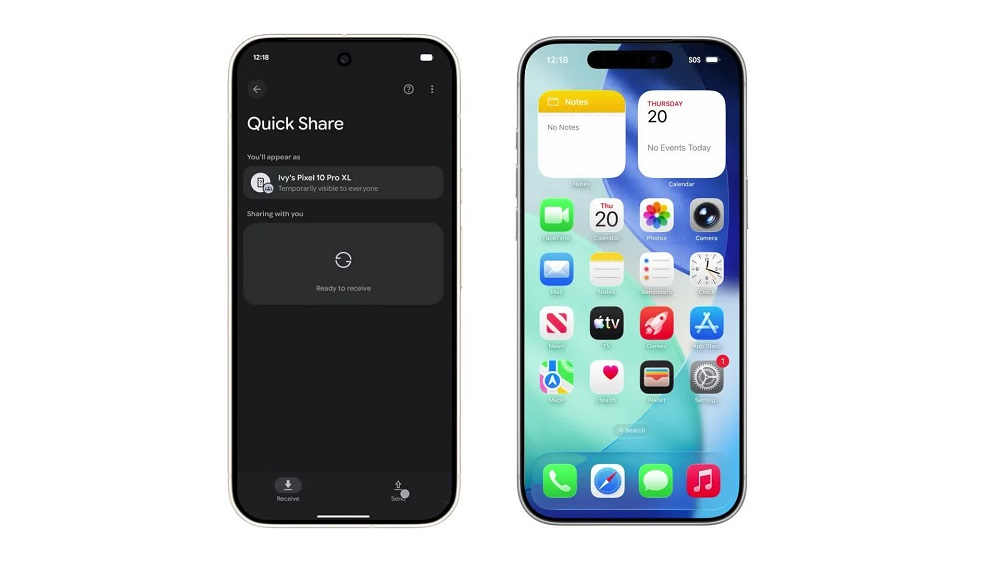
The app now allows Google Pixel phones to send files to iPhones using Apple’s Airdrop system.
This change applies from the Google Pixel 10 series and newer models.
How Airdrop works
Airdrop is a file-sharing system used only by Apple devices.
It works on iPhones, iPads and Mac computers.
Until now, only Apple users could share files with each other through Airdrop.
New cross-platform sharing
Google says Pixel users can now send photos, videos, documents and other files to iPhones.
The Pixel user sends files using Quick Share.
The iPhone user receives them using Airdrop.
This update makes it easier for people using different devices to exchange information.
Google explains the change
Google says this update aims to help people share files without being limited by the device they use.
The company stated that it wants to support smooth communication between both tech ecosystems.
How the system works
Quick Share uses the same process as Airdrop.
The iPhone user must open Airdrop.
Once opened, the device stays visible for 10 minutes.
During this time, Quick Share can detect the Airdrop signal and send files to the iPhone.
Related posts:
 Why Pope Francis’ Death Leaves Argentina Feeling ‘Orphaned’
 Nigeria: Finance Minister to Be Replaced Over Health Concerns
 Stolen Phones Worth Over Rwf 90 Million Recovered in Seven Months
 Traoré Attends Moscow’s Victory Day Parade
 United States: Human Remains Now Being Turned Into Soil Used for Farming
 North Korea Unveils Hwasong20, Its Most Powerful Missile Yet
 Fred Gisa Rwigema: A Hero’s Sacrifice for Rwanda’s Peace
 Israel Defies Trump’s Call, Kills 50 People in Gaza
 DR Congo, M23 Rebels Sign Landmark Deal in Qatar to End Eastern Conflict
 Australia Sunscreen Scandal Expands as More Products Pulled from Shelves
 Over 67,000 Killed: Two Years of Relentless War in Gaza
 Russia’s Victory Day Parade: A Day of Pride and Memory
 Trump Could Meet Kim Jong Un During Upcoming Asia Tour
 The Myth of “Hard Work Pays”: Why Effort Alone Isn’t Enough
 Pakistan and Afghanistan Agree to Immediate Ceasefire After Doha Talks
 China Accuses U.S. of Long-Term Cyberattacks on National Time Agency
 Rwanda Moves to Curb Online Pornography as New Child Protection Policy Takes Effect
 RDF Addresses Drone Incident in Rutsiro
 Trump Calls for Arrest of Chicago Mayor and Illinois Governor
 Elon Musk Urges People to Stop Using Netflix